
Your calendar isn’t really yours. Between eight direct reports who all need time, three projects that need updates, and four cross-functional initiatives that keep adding meetings you didn’t ask for, the hours your boss assumes you’re finding for actual strategic work somehow never appear on the schedule.
Most calendar apps are passive. They show you what’s already there, let you add events, and send reminders, but none of them help you protect the time you need for the work that actually matters.
Reclaim for managers is different. It’s an AI scheduling tool that actively defends time on your calendar for the things you keep promising yourself you’ll get to, like focus time, 1-on-1s that don’t get bumped, and the strategic thinking your job actually requires. It does all of this in the background while you keep working, automatically rearranging your calendar as new meetings come in.
This article covers what Reclaim does, where it genuinely helps managers, where it falls short, and whether the $8 per month subscription is worth adding to whatever you’re already paying for.
Key Takeaways
- Use Reclaim to auto-protect focus time across your week — set a weekly target and let it move blocks rather than letting meetings overwrite them
- Set up automated 1-on-1 scheduling with each direct report so meetings reschedule themselves when conflicts hit, instead of getting silently canceled
- Skip Reclaim if you live in the Apple ecosystem — iCloud Calendar integration is rough; it works best with Google or Outlook
- Start with the free Lite plan for two weeks before paying for Starter ($8/mo); if you forget you installed it, save the money
- Don’t configure everything on day one — connect your calendar, set up one focus time habit, add one smart 1-on-1, then use it for two weeks before adding more
Table of Contents
What Reclaim Actually Does
Reclaim is fundamentally different from the AI tools you’re probably already using. It’s not a chatbot. You don’t ask it questions or have it draft anything for you. It’s an automation layer that sits on top of your existing calendar and makes scheduling decisions for you in the background.
Smart Calendar Events That Move Themselves
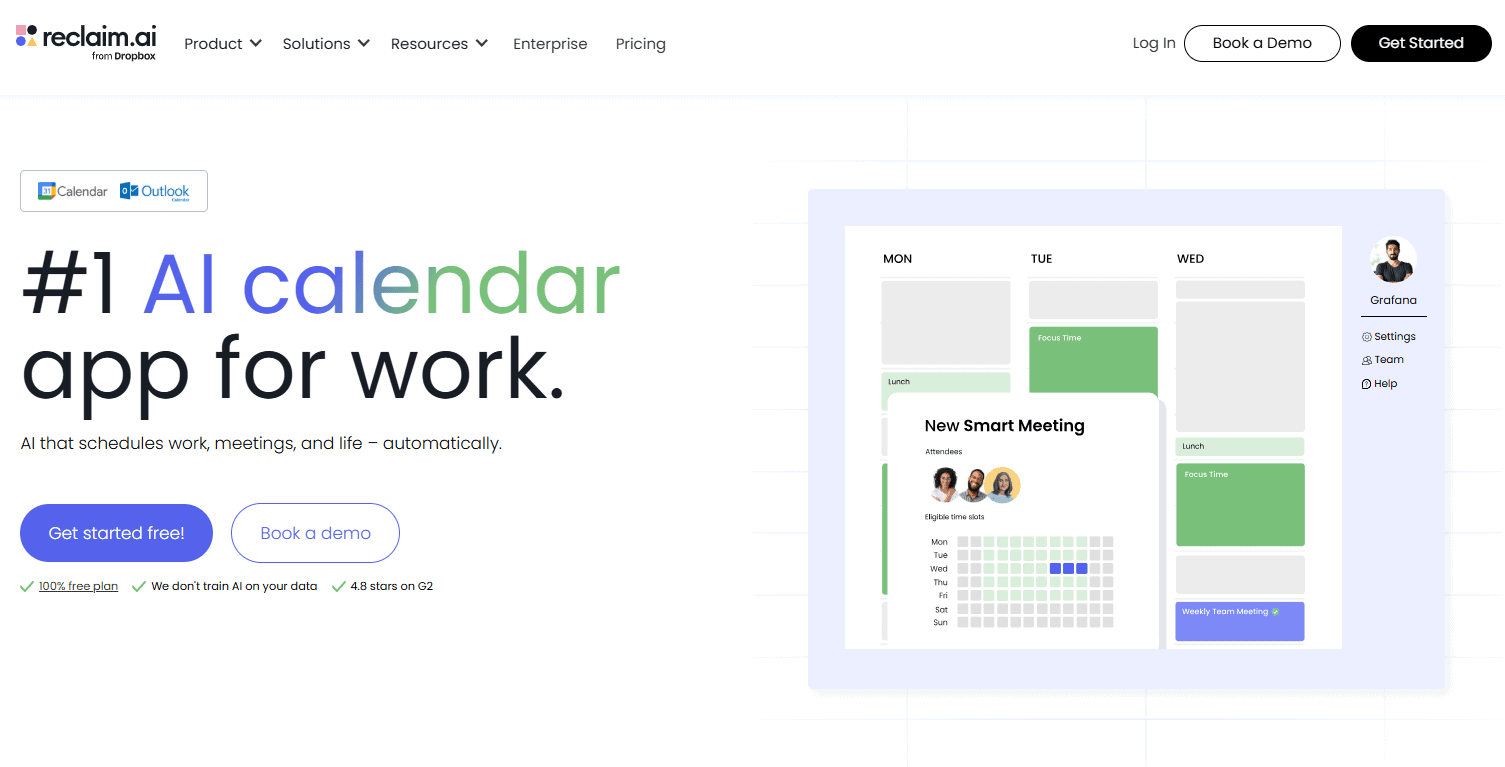
You connect Reclaim to your Google Calendar or Outlook, and it starts working immediately. You tell it about the recurring time you need to protect, like a daily focus block, weekly 1-on-1s with each direct report, or a habit like exercise or lunch. Reclaim then finds the best time slots for each of those on your calendar and books them as smart events. The difference between a regular calendar event and a smart event is that smart events know how to move themselves. If a meeting comes in that conflicts with your focus block, Reclaim automatically reschedules the focus time to a different open slot in your week instead of letting it disappear entirely.
Automated 1-on-1 Scheduling Across Calendars
It also handles 1-on-1s in a way that traditional calendar apps cannot. You set up a 1-on-1 between you and a direct report with a target frequency and a target duration. Reclaim looks at both calendars, finds the best mutual availability, and books it. When a conflict arises later, it negotiates the reschedule across both calendars without you having to send a “can we move this” message. For a manager with eight direct reports, that’s an enormous amount of friction removed from your week.
Where Reclaim Helps Managers Specifically
Reclaim has a lot of features, but most of them aren’t built for managers specifically. The five use cases below are where the tool genuinely changes how a manager’s week runs.
Defending Focus Time
Every manager knows the feeling. You blocked off two hours Tuesday afternoon for strategic work. By Tuesday morning, three meetings have been booked over it. By Tuesday afternoon, you’re catching up on email instead of doing the thinking your job actually requires. Focus time disappears because nothing is protecting it. Reclaim does the protecting for you. You set a goal for how much focus time you want each week, and it auto-books that time across your calendar in slots that work around your existing meetings. When new meetings come in, Reclaim moves your focus time rather than letting it get overwritten. Over the course of a week, you actually end up with the deep work hours you intended to have.
Scheduling 1-on-1s That Actually Happen
Recurring 1-on-1s are easy to set up and easy to skip. Someone has a conflict, the meeting gets canceled, and then it never gets rescheduled because nobody wants to navigate two busy calendars manually. Three weeks later, you realize you haven’t had a real conversation with one of your direct reports in over a month. Reclaim’s 1-on-1 feature solves this by treating the meeting as a goal rather than a fixed event. The system actively finds time on both calendars and rebooks when needed. Your direct reports notice when their 1-on-1s consistently happen, and they notice when they don’t.
Managing Habits That Keep You Sane
Lunch breaks. Exercise. The 30 minutes at the start of the day where you actually plan instead of reacting. These are the things every productivity book tells you to protect, and they’re the first things to disappear when your calendar fills up. Reclaim treats these as Habits and defends them like meetings. You’re less likely to skip lunch when there’s a calendar block telling everyone you’re unavailable. You’re more likely to actually leave the office at 5 if your calendar shows commute time blocked off.
Buffer Time Between Meetings
Back-to-back meetings are where managers burn out. You finish one conversation, sprint to the next one, and never have a chance to process what was said or prepare for what’s next. Reclaim can automatically add buffer time before and after meetings of certain types, so you have ten minutes to gather your thoughts instead of immediately pivoting to a different topic. Small change, big impact on how the day actually feels.
Smart Scheduling Across Multiple Calendars
If you have separate work and personal calendars, Reclaim syncs them so meetings booked on one don’t conflict with the other. You can keep them visually separate while still ensuring nobody books you for a 6 PM call when you have a kid’s soccer practice. For managers juggling work and personal commitments, this single feature can be worth the subscription on its own.
Where Reclaim Falls Short
Reclaim is excellent at one specific thing: automating calendar logistics. The moment you expect it to do anything else, the limitations become obvious.
It’s Not a Writing or Drafting Tool
If you’re hoping Reclaim will help you draft a status update, summarize a report, or generate prompts for a 1-on-1, you’re using the wrong tool. Reclaim doesn’t generate content of any kind. It manages when things happen on your calendar, not what you do during those time blocks. ChatGPT and Claude are still better for the writing work. Think of Reclaim as the tool that protects the time you’ll spend using ChatGPT, not as a replacement for it.
It Can’t Decide What’s Important for You
Reclaim defends the time you tell it to defend, but it has no opinion on whether you’re spending your time on the right things. If you set up Habits for low-value activities, Reclaim will faithfully protect those activities at the expense of higher-value work. The tool only works as well as your own prioritization. Garbage priorities in, garbage scheduling out.
iCloud Calendar Is Still Painful
If you live in the Apple ecosystem and want to integrate iCloud Calendar with Reclaim, the experience is rough. There’s no native iCloud connector, and the workarounds involve creating subscription calendars and dealing with sync delays. For managers using Outlook or Google Calendar, this isn’t an issue. For Apple-first managers, it’s a real friction point that may push you toward a different tool.
The Learning Curve Is Real
Reclaim has a lot of settings. Habits, Smart Meetings, Tasks, Scheduling Links, Buffer Time, Travel Time, Slack Sync, and more. The first few hours of setup require thinking through how you actually want to manage your time, which is itself useful but not effortless. Most managers won’t realize the full value of the tool until they’ve used it for two or three weeks and refined their setup based on how it actually performs.
Per-User Pricing Adds Up for Teams
If you want to roll Reclaim out to your whole team for the team scheduling features, the math gets less appealing. A 10-person team on the Business plan is $120 per month. For comparison, that’s more than most teams pay for their entire collaboration suite. The individual value is high. The team value depends on how much you actually need cross-calendar features versus just having each person manage their own time better.
Free vs Paid: Is Reclaim Worth $8/Month?
The pricing question is the most important one, because Reclaim is competing for the same $8 to $20 per month that you’re probably already spending on ChatGPT, Claude, or another AI tool.
The Lite Plan (Free)
Lite gives you a real taste of the product. You can connect one calendar, set up one Habit, create up to three Smart Meetings, and use one Scheduling Link. For a manager who wants to test whether the concept of automated scheduling fits their workflow, Lite is enough to get a meaningful read in about a week. The limitations become obvious quickly though. One Habit means you can protect either focus time OR exercise OR lunch, but not all three. Three Smart Meetings disappears the moment you try to set up 1-on-1s with a normal-sized team.
The Starter Plan ($8/user/month, annual)
This is the plan most individual managers will land on. Unlimited Habits, unlimited Smart Meetings, multiple task integrations, and access to scheduling links. At $8 per month with annual billing, it’s competitively priced against the other AI tools you’re paying for. The honest test is whether you actually use the smart scheduling features enough to justify another subscription. Some managers find Reclaim becomes invisible infrastructure within a month. Others realize they were happy enough manually managing their calendar and let the subscription lapse. The free tier should answer this question for you within two or three weeks of real use.
The Business Plan ($12/user/month, annual)
Business adds team analytics and admin controls. The team analytics are interesting if you’re managing managers and want visibility into how teams are spending their time. For most individual contributor managers, the additional features don’t justify the 50% price increase over Starter. If your company is buying it for the team, that’s a different conversation. If you’re buying it for yourself, Starter is the right tier.
The Honest Recommendation
Start with Lite. Use it for two weeks. If you find yourself running into the limits and wishing you had more Habits or Smart Meetings, upgrade to Starter. If you forget you installed it, save the $8. Reclaim is genuinely useful for managers whose calendars are chaos, but it requires you to actually engage with the setup. If you’re not going to invest the time to configure it properly, no plan is worth paying for.

How to Start Using Reclaim for Managers This Week
Don’t try to set up everything at once. The fastest way to abandon Reclaim is to spend two hours configuring every feature on day one and then never look at it again. Pick one thing, get it working, see if it sticks.
Step 1: Connect Your Calendar
Go to reclaim.ai and sign up with your Google or Outlook account. The integration takes about a minute. Reclaim will pull in your existing calendar so it can see what you’re already booked for. Don’t worry about anything else yet.
Step 2: Set Up One Focus Time Habit
Skip everything else and create one Habit called “Focus Time.” Set it to two hours per day, three days a week, during your typical morning hours. Reclaim will start auto-booking those blocks on your calendar, working around your existing meetings. This is the single highest-value feature and the one you’ll feel within the first week.
Step 3: Add One Smart 1-on-1
Pick the direct report whose 1-on-1 gets canceled most often. Set up a Smart 1-on-1 with them at your usual frequency (weekly, biweekly, whatever). Have them set up a free Reclaim account too so the tool can see both calendars. Now watch what happens when one of you has a conflict. The reschedule will happen automatically, without the back-and-forth that usually kills these meetings.
Step 4: Use It for Two Weeks Before Adding More
Resist the urge to immediately set up Habits for exercise, lunch, breaks, and every other thing you’ve been meaning to protect. Let the focus time and 1-on-1 features prove themselves first. After two weeks, you’ll have a feel for whether the auto-scheduling actually fits your work style. If it does, layer in additional Habits one at a time. If it doesn’t, you’ve only invested 30 minutes and you can move on.
The managers who get the most out of Reclaim and other AI productivity tools treat them like infrastructure. Set them up, let them run, and only revisit when something isn’t working. The ones who try to actively manage their AI tools usually end up spending more time on the tools than the tools save them. That’s the whole point of automation. If you’re babysitting it, it’s not working.
Frequently Asked Questions
Is Reclaim free?
Yes, the Lite plan is free forever for a single user. It includes one calendar sync, one Habit, three Smart Meetings, and one Scheduling Link. That’s enough to test the concept but not enough for sustained daily use. Paid plans start at $8 per user per month with annual billing.
Does Reclaim work with Outlook?
Yes. Reclaim has full native Outlook integration with feature parity to its Google Calendar version. Some users have reported occasional notification quirks, but the core scheduling features work the same way in both ecosystems.
Will Reclaim conflict with the meetings my team books on my calendar?
No. Reclaim only manages the smart events it creates (Habits, Smart Meetings, and Tasks). Regular meetings booked by other people stay exactly where they are. When a new meeting conflicts with one of your smart events, Reclaim moves the smart event automatically. Your colleagues never see anything change on their end.
Do I need to convince my whole team to use Reclaim for it to work?
For individual scheduling like Focus Time and Habits, no. You can use Reclaim solo and get most of the value. For 1-on-1 scheduling to work optimally, the other person needs at least a free Reclaim account so the tool can see both calendars. They don’t need a paid plan, just an account.