
Every list promising the best AI assistant for managers ends the same way: a winner gets crowned, the winner changes by the next product cycle, and the manager who standardized on it starts over. The ranking was never the problem. The question was. There is no single best assistant for every manager, because the right choice depends on three things no leaderboard can see: which ecosystem your company runs, what kind of work eats your week, and what your budget and data rules allow.
Get those three right and the decision mostly makes itself. A Microsoft-shop manager drowning in Teams meetings has a different best answer than a writing-heavy manager at a startup with no suite loyalty, and both differ from the manager whose real bottleneck is research they can defend upward. The five tools that matter, ChatGPT, Claude, Gemini, Microsoft Copilot, and Perplexity, are each genuinely best at something. None of them is best at everything, and all of them cost close enough to the same $20 that price rarely breaks the tie.
So this guide works as a decision method rather than a ranking. You get an honest profile of each assistant through a manager’s lens, the three-axis framework that turns your situation into a shortlist, recommendations by manager type, and the governance realities that override all of it. Every profile links to the deeper review, and every likely matchup links to its full head-to-head. Built to survive model churn, because the tools will change again before this year is out. Your method shouldn’t have to.
Key Takeaways
- There is no single best AI assistant for managers, so choose with a framework instead of a winner: what your company runs, your heaviest recurring task, and what budget and policy allow.
- Ecosystem usually decides first. Microsoft shops get Copilot, Google shops get Gemini bundled in Workspace, and fighting that default rarely pays off.
- Match the tool to your heaviest task: ChatGPT as the fast generalist, Claude for careful high-stakes writing, Perplexity for sourced research, and Copilot or Gemini for in-suite grunt work.
- Price is close to a non-factor at the personal tier since ChatGPT, Claude, Gemini, and Perplexity all sit near $20; policy and data rules are the real constraint.
- Judgment and governance override the framework: confirm what your IT agreement allows, and re-evaluate on a schedule so your choice survives the next model launch.
Table of Contents
The Five Tools and the Three Questions
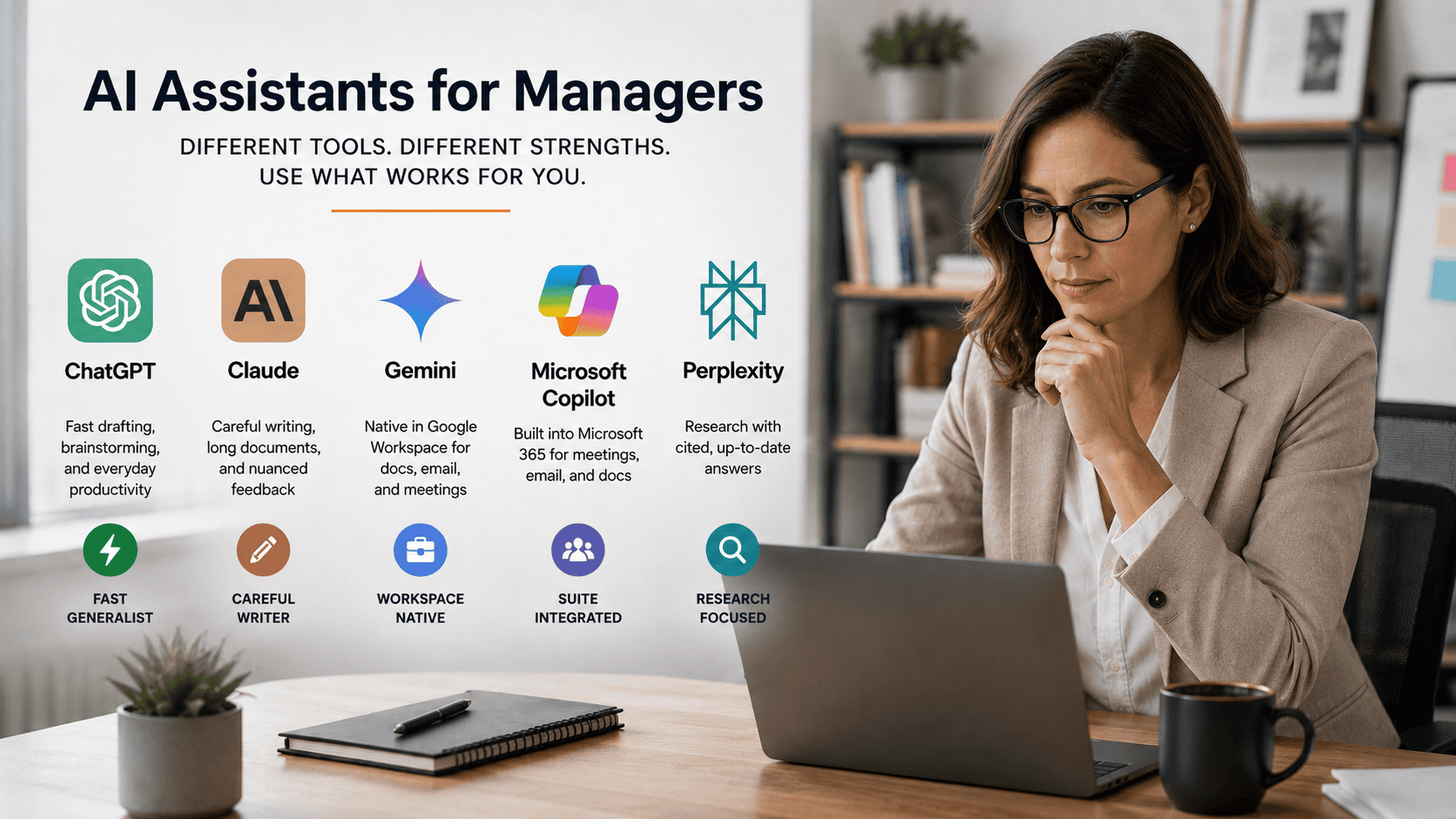
Here’s the field in one view, with the deeper dives linked throughout the piece:
| Assistant | Best management use | Ecosystem fit | Price reality |
|---|---|---|---|
| ChatGPT | Fast drafting, brainstorming, pressure-testing ideas | Any stack | Plus at $20/mo |
| Claude | Careful writing, reviews, long-document analysis | Any stack | Pro at $20/mo |
| Gemini | Drafting and recaps inside Google Workspace | Google Workspace | ~$20/mo solo, often already in Workspace Business seat prices |
| Microsoft Copilot | Teams recaps, Outlook triage, in-suite document work | Microsoft 365 | Free Chat tier for all M365 users; full version ~$30/seat, org-purchased |
| Perplexity | Research with cited, current answers | Any stack | Pro at $20/mo |
If terms like context windows and tokens are still fuzzy, the AI glossary is a two-minute companion read. Otherwise, the whole decision runs on three questions.
Question one: what does your company run?
Ecosystem comes first because it determines where an assistant can operate. If your email, meetings, and documents live in Microsoft 365, Copilot can work inside that world in a way no outside tool can match. If they live in Google Workspace, Gemini gets the same home-field advantage, and it’s often already paid for in the seat price. If your stack is mixed or unsettled, the suite-native argument disappears, and the ecosystem-agnostic tools, ChatGPT, Claude, and Perplexity, compete on pure capability. A manager who picks against their ecosystem spends the savings moving context between tabs.
Question two: what’s your heaviest recurring task?
Not the most interesting task, the heaviest one. Writing-heavy managers, the ones whose hard hours go to reviews, feedback, and careful documents, should weight Claude. Broad-drafting managers who mostly need speed across everything should weight ChatGPT. Research-heavy managers whose output has to survive scrutiny should weight Perplexity. And managers whose week is mostly coordination inside the suite, recaps, triage, and follow-ups, should weight whichever native assistant their company runs.
Question three: what do budget and policy allow?
Free tiers cover experimentation. A paid seat at ~$20 makes sense the week an assistant joins your operating rhythm. And company policy overrides both: if your organization has rules about where employee data can go, the sanctioned platform wins for anything sensitive, whatever this framework says.
The shortcut version: Microsoft shop with meeting-heavy work, Copilot first. Google shop with doc-heavy work, Gemini first. No ecosystem lock-in and writing-heavy, Claude first. No lock-in and research-heavy, Perplexity first. Mixed everything, ChatGPT first, then add a specialist only where it clearly beats the generalist.
For the task-by-task version of that logic across the three standalone assistants, the ChatGPT vs Claude vs Gemini routing guide is this piece’s companion, one level down in detail.
The Five Assistants Through a Manager’s Lens
The category has quietly shifted from chatbots to coordination tools, and industry roundups of AI assistants for work increasingly group these five as answers to different workflows rather than rivals for one crown. Here’s each one judged on management work specifically, with its honest limitation attached.
ChatGPT: the fast generalist
ChatGPT is the strongest starting point for managers who need speed across everything: first drafts, agendas, brainstorms, quick pressure-tests of a plan before it meets a stakeholder. It iterates well when you push back, and it adapts to any role or format without ceremony. The limitation is context. It’s still a destination you bring work to, so the meeting notes, the spreadsheet, and the thread all arrive by paste. What the $20 tier actually includes is covered in the ChatGPT Plus for managers breakdown.
Claude: the careful writer
Claude earns its seat on the work where words carry weight: performance reviews, difficult feedback, policy language, and long-document synthesis, helped by a context window that takes months of notes in one conversation. Its drafts tend to arrive measured and need fewer tone rescues. The limitation is scope. It’s a deliberate tool that rewards a clear use case, and it won’t replace a suite-native assistant for coordination work. The Claude for performance reviews guide covers its signature workflow.
Gemini: the Google Workspace native
Gemini wins on placement. It works inside Gmail, Docs, Sheets, and Meet, its work features come bundled into Workspace Business Standard and above, and paid tiers add a very large context window for document-heavy work. For a Google-shop manager the friction savings are immediate. The limitation is the mirror image: outside the Google ecosystem, most of its advantage evaporates. The full Gemini review walks the day-to-day.
Microsoft Copilot: the suite operator
Microsoft 365 Copilot is the clearest answer for Microsoft-heavy workplaces: Teams recaps, Outlook triage, and Excel work happen where the documents and meetings already live, with your company’s files as context. Two limitations. Its quality tracks your company’s Microsoft hygiene, and “we have Copilot” often means the free Chat tier rather than the full ~$30-per-seat version, which are very different tools. The Copilot guide for managers sorts all of that out.
Perplexity: the research specialist
Perplexity is built to answer with current, cited sources, which makes it the trust choice for vendor diligence, market scans, and policy questions where someone might ask where a claim came from. The limitation is deliberate: it’s a research lane, not a drafting lane, and it pairs best with a generalist that turns its findings into finished work. The Perplexity guide for managers covers when it earns a paid seat.
Recommendations by Manager Type
The framework turns into a shortlist fastest when you can see yourself in a situation. Five cover most managers.
The Microsoft-shop manager
Make Copilot the primary and let it own everything that starts and ends in the suite: Teams recaps, Outlook triage, in-file Excel questions. The real decision is the second seat, because most Microsoft-shop managers keep a standalone tool for the high-judgment writing Copilot handles only adequately. The ChatGPT vs Copilot split covers the everyday version of that pairing, and Claude vs Copilot covers the writing-heavy version. If your company is mid-migration or straddling suites, Copilot vs Gemini explains why that choice was probably made above your head anyway.
The Google-shop manager
Default to Gemini, and check your Workspace tier before paying for anything, because on Business Standard and above it’s already in the seat price. The open question is whether you still need a standalone generalist on top, and the honest answer tracks how much careful writing you do: ChatGPT vs Gemini walks the everyday case, and Claude vs Gemini settles the writer-versus-native question directly.
The ecosystem-agnostic manager
With no suite gravity, pick the generalist that matches your work’s texture: fast and broad points to ChatGPT, careful and long-form points to Claude, and the ChatGPT vs Claude comparison is the tiebreaker read. If your team runs its work in Notion, the Notion AI review covers the workspace-native option worth knowing about before you add a second subscription.
The writing-heavy manager
If reviews, feedback, and sensitive documents are your hard hours, weight Claude as the primary even inside a suite ecosystem, and keep the native assistant for coordination. The dozen moments a month where draft quality changes an outcome justify the $20 on their own, and the pairing costs nothing in workflow: the suite tool handles the recaps, Claude handles the words that matter.
The research-heavy manager
If your output has to survive scrutiny, vendor calls, strategy claims, and policy questions, put Perplexity first and pair it with a generalist for synthesis. Research lands in Perplexity with sources attached, then becomes a memo in the drafting tool. The Perplexity vs ChatGPT breakdown maps exactly where that handoff sits.

What Overrides the Framework: Judgment and Governance
Two realities outrank every recommendation above.
The first is that every assistant still needs a human editor. AI accelerates the first draft; the manager remains accountable for accuracy, tone, and fairness in whatever ships. The strongest workflow across all five tools is identical: use the model for structure and speed, verify the specifics yourself, and never send a people-document you haven’t fully owned.
The second is data discipline. Confidential performance notes, compensation detail, and deal terms belong in whatever platform your company has sanctioned, full stop. On a personal account, everything the assistant knows is something you chose to paste, so strip identifiers where the tool doesn’t need them and keep the sensitive material inside approved walls.
This is mainstream hygiene now, not caution for its own sake: McKinsey’s State of AI research found roughly two-thirds of organizations already using generative AI regularly by 2024, and Microsoft’s Work Trend Index put AI use among knowledge workers around three-quarters the same year, figures manager-focused roundups keep citing because they mark the shift that matters. The question stopped being whether your team uses AI. It’s whether the boundaries are explicit, and setting them is your job whichever assistant wins.
A Method That Survives the Next Model Launch
The tools in this guide will all ship something new before the year is out, which is exactly why the method matters more than today’s answer. Three habits keep the choice honest.
Run the 30-day test when you’re genuinely unsure. Pick the ecosystem-native option, use it deliberately for a month, and measure where it saves real time against one generalist and one research tool. Your own month of data beats any leaderboard, this one included.
Re-check quarterly, not constantly. A quarterly look at three things, whether your heaviest task has shifted, whether your company’s stack has moved, and whether policy has changed, catches every reason the answer should change. Chasing each model launch in between is noise.
Expect to run more than one, on purpose. Most managers land on a primary assistant plus one specialist, and that’s workflow design rather than indecision. The full best AI tools for managers hub maps the wider kit around the assistant choice, and if you’re earlier in the journey, the guide on how to use AI as a manager covers building the habits that make any of these tools pay.
Pick by fit, run the test, revisit quarterly. The crown changes hands every few months. Your method shouldn’t.
Frequently Asked Questions
What is the best AI assistant for managers?
There’s no single winner, and any answer claiming one is selling something. Copilot is best inside Microsoft 365, Gemini inside Google Workspace, Claude for careful writing-heavy work, ChatGPT as the fast all-purpose generalist, and Perplexity for research that needs cited sources. Match the tool to your ecosystem, your heaviest task, and your budget, in that order.
Should a manager use more than one AI assistant?
Usually yes, and deliberately. The most common working setup is a primary assistant matched to your ecosystem or heaviest task, plus one specialist: a suite-native tool for coordination alongside a standalone for high-judgment writing, or a generalist alongside Perplexity for research. Two tools with clear jobs beat one tool stretched across everything.
Is a paid AI assistant worth it for managers?
Once the assistant joins your weekly rhythm, almost always. The ~$20 individual tiers pay for themselves in a few saved hours a month, and paid seats add the capability and privacy controls that management work actually needs. Start free while experimenting, and upgrade the week you notice you’d miss the tool if it vanished. Check what’s already covered first, since Google-shop managers often have Gemini in the seat price.
How often should managers re-evaluate their AI assistant choice?
Quarterly is enough. Model launches arrive monthly, but the things that should actually change your answer, your company’s ecosystem, your heaviest recurring work, and your data policy, move slowly. A quarterly check of those three keeps the choice current without turning tool selection into a hobby.